
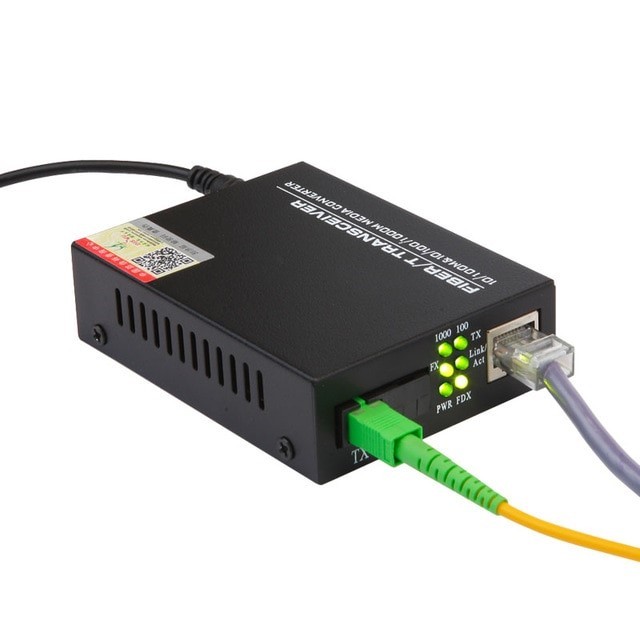
In a world obsessed with Wi-Fi speeds and cloud dashboards, it’s easy to overlook the humble hardware that actually moves your data from Point A to Point B. Two silent heroes—transceivers and media converters—do the heavy lifting that keeps campus networks snappy, data centers humming, and surveillance backbones stable. If you’re expanding a network, adding fiber to reach new buildings, or squeezing more life out of existing copper, understanding Transceivers/Media Converters will save you time, money, and headaches.
Quick Definitions (No Jargon, Promise)
Transceiver (short for transmitter/receiver):
A compact, pluggable module that slots into a network switch, router, or server NIC to convert electrical signals to optical (or back) and set the data rate and distance. Think SFP, SFP+, QSFP28—each is a form factor for different speeds and use cases.
Media Converter:
A standalone device that converts one physical medium to another—typically copper (RJ-45) to fiber (LC/SC)—without changing your existing switches. It’s the easiest, most cost-effective way to bridge long distances or harsh environments without ripping and replacing gear.
When Do You Need a Transceiver vs. a Media Converter?
-
Use a Transceiver when…
-
Your switch/server has SFP/SFP+/QSFP slots.
-
You want native optical uplinks for clean, high-density wiring.
-
You need specific reach/speed combos (e.g., 10GBASE-SR inside a rack; 10GBASE-LR across buildings).
-
-
Use a Media Converter when…

-
Your existing switch is copper-only, but you must run fiber to a faraway IDF or outdoor cabinet.
-
You’re extending PoE cameras or access points beyond 100 meters of copper.
-
You want fiber resilience (EMI immunity, longer runs) without replacing core hardware.
-
Often, teams use both: a media converter at one end to introduce fiber, and a transceiver on the core switch to terminate it properly.
Common Transceiver Types (and What They’re Good For)
-
1G SFP – Affordable, rock-solid for access/aggregation.
-
SR (short-reach, multimode): up to ~300–550 m inside buildings.
-
LR (long-reach, single-mode): up to 10 km for campus links.
-
BX (bi-di): single fiber strand using different wavelengths to send/receive—perfect when conduit space is tight.
-
-
10G SFP+ – Sweet spot for modern backbones and server uplinks.
-
SR/LR/ER/ZR extend from data hall distances to tens of kilometers.
-
DAC/AOC cables: cheap, simple links within racks/rows (no optics required).
-
-
40G/100G QSFP/QSFP28 – High-density data center links.
-
Breakout cables (e.g., 100G → 4×25G) give you flexible topologies.
-
Great for spine-leaf and hyperconverged workloads.
-
Pro tip: Match form factor to your port, speed to your current and near-future needs, and wavelength/distance to your fiber type (multimode vs. single-mode).
Media Converters: Unsung ROI Champions
Media converters shine when budgets and timelines are tight:
-
Extend Beyond 100 m: Copper Ethernet maxes out at ~100 m; fiber pushes you to kilometers.
-
Beat EMI/RFI: Industrial floors, elevator shafts, or hospitals—fiber laughs at interference.
-
Future-Proofing: Pull fiber now, run 1G today, upgrade to 10G later by swapping optics—not the cable.
-
Protect PoE Plans: Use PoE-capable converters (or PoE pass-through models) to keep cameras and APs powered at the edge.
Look for managed media converters if you want SNMP monitoring, VLAN transparency, and loop prevention. For simple point-to-point runs, unmanaged models are cheaper and perfectly fine.
Matching Optics to Fiber (Avoid the Pain Later)
-
Multimode (OM3/OM4): Shorter distances, larger core, generally cheaper optics. Use SR or DR (in newer standards) inside buildings and data halls.
-
Single-Mode (OS2): For long distances and campus links. Use LR/ER/ZR where needed.
-
Connector Types: LC is the modern favorite; SC still appears in legacy gear. Check what your patch panels support.
-
Wavelength & Budget: At 10G+, LR (1310 nm) single-mode optics often deliver the best “distance per dollar.”
Compatibility: The Gotcha You Shouldn’t Ignore
-
Vendor Lock-In: Some switches are picky about “coded” optics. Third-party transceivers can be coded for your switch brand—saves cost without sacrificing reliability.
-
DDM/DOM Support: Real-time diagnostics (temperature, TX/RX power) help you avoid blind troubleshooting.
-
Link Budget Checks: Distance ≠ guarantee. Verify attenuation, splice counts, and patch quality against the spec sheet.
Real-World Scenarios
-
Multi-Building Campus, Limited Budget
You’ve got copper-only switches in remote buildings. A pair of media converters with single-mode fiber gives you stable 1G/10G uplinks now, no switch refresh required. -
Warehouse with Interference
Forklifts, motors, and long cable runs wreak havoc on copper. Swap the long segment for fiber using converters; keep the rest of the copper patching intact. -
Data Center Leaf-Spine
Densify your fabric with QSFP28 optics and AOC/DAC inside racks. It’s tidy, power-efficient, and scalable. -
CCTV Expansion
Cameras need to live 400–800 meters away? Use PoE media converters near the camera and run fiber back to the MDF—no repeaters, no flaky links.
Buying Checklist (Save This)
For Transceivers
-
Port and form factor required (SFP/SFP+/QSFP28)
-
Speed (1G, 10G, 25G, 40G, 100G)
-
Distance and fiber type (SR for MMF, LR for SMF, etc.)
-
Compatibility coding for your switch brand
-
DOM/diagnostics support
-
Warranty and advance replacement
For Media Converters
-
Copper/fiber interfaces you need (RJ-45 ↔ LC/SC)
-
Speed/duplex auto-negotiation and fixed-rate options
-
Managed vs. unmanaged (SNMP, VLAN transparency, loop guard)
-
Power options (PoE in/out, redundant power, DIN rail for industrial)
-
Operating temperature range for outdoor/harsh installs
Deployment Tips from the Field
-
Label Both Ends: Use port/fiber labels that match your documentation—future you will say thank you.
-
Test Light Levels: After termination, check TX/RX power with DOM or a simple meter.
-
Keep Spares: One extra SR and LR module in the drawer can rescue an outage in minutes.
-
Clean the Ferrules: A dusty connector can fake a “bad transceiver.” Use proper cleaning tools.
-
Plan for Growth: If you’re pulling new fiber, consider extra strands. Dark fiber today is agility tomorrow.
Why Source from a Trusted IT Partner
Transceivers and media converters are small, but they’re not trivial. A reliable partner will validate compatibility, help with coding for your switch vendor, advise on reach vs. budget, and provide solid warranty support. If you prefer a curated, stress-free buying experience, check out Tecisoft for a wide selection of standards-compliant optics, media converters, and cabling accessories backed by knowledgeable support.
FAQ: Fast Answers
Q: Can I mix brands—switch from Vendor A, transceiver from Vendor B?
A: Often yes, if the transceiver is correctly coded for Vendor A’s ports. Work with a supplier who guarantees compatibility.
Q: Do I need multimode or single-mode?
A: Inside a building or short runs, multimode (SR) is fine. For distances over a few hundred meters or building-to-building links, single-mode (LR/ER/ZR) is safer.
Q: Are media converters a long-term solution?
A: Absolutely. Many enterprises run them for years, especially where upgrading switches en masse isn’t practical. Managed models add observability and reduce truck rolls.
Q: What about 2.5G/5G (NBASE-T) needs?
A: Look for multispeed converters and transceivers; ensure your switches and NICs support the same rates for clean auto-negotiation.
The Bottom Line
Transceivers/Media Converters let you stretch distance, dodge interference, and scale performance without wholesale hardware swaps. Get the form factor right, match fiber to distance, confirm compatibility, and choose support you can reach by phone. Do that, and you’ll unlock more speed and stability from the network you already own—while keeping capex in check and your team off the ceiling tiles





